Like many others all over the planet, my family are having to get used to staying at home at the moment. My children are both grown up and capable of keeping themselves occupied, but I know that many parents may be struggling to keep younger children engaged and entertained. In an effort to help with this, many children’s authors and illustrators are producing videos, activity sheets and other online resources for families to view and download.
Children’s author Caryl Hart has set up an
Authors Events Online page on her web site which links to resources that children’s authors and illustrators have created for stay at home families and I have set up an associated Facebook page
Picture Book Authors Events Online to share new videos that picture book authors and illustrators have created for stay at home families.
If you are a picture book author or illustrator and have made a video that you would like to be shared on the page, you can contact the page via the link below the page header, but
please accept that the videos we share are selected at our discretion and check that your video is likely to be eligible under the page’s Sharing Policy first. The page only shares new videos created by traditionally published picture book authors and illustrators (see the Sharing Policy for further details). Traditionally published picture book creators can also live-stream directly from the page using Facebook Live. If you would like to live-stream from the page, email me and I can send you a walkthrough for live-streaming from a desktop or laptop computer.
I have been using a webcam to engage with online audiences for several years through my
virtual school visits, but I know that many authors and illustrators are getting to grips with recording and broadcasting from a desktop or laptop computer for the first time, so I thought I would share some of the things I have learnt over the years. Several of these tips can also be found in my
10 Top Tips for Great Virtual Author Visits and most of them apply to recording video on a phone or tablet.
My Seven Top Tips for Recording and Broadcasting from a Computer
1: Dress the room
Treat the room that you are recording in as a set. Do you want a blank wall behind you or something that relates to your work. I have posters of my books on the wall opposite my webcam and have stuck cutout characters from one of my picture books on the edge of the bookcase that fills the left hand side of the screen.
If you have props or banners that relate to a particular book you are featuring in the recording, you could place them in the background.
You might also consider dressing yourself!
2: Be seen in the right light
Unless you actually want your audience to see you as a sinister silhouette, make sure your face is adequately lit when you’re on camera.
If you’re using a computer with a large screen to record, bear in mind that the screen itself is a light source. If the desktop on your computer is bright green and there’s not much light coming from your surroundings, your face may be bathed in a sickly green light. This might be perfect if you’re reading a horror story, but if you're not, then a neutral-coloured desktop (or a blank white document) will illuminate your features without a colour cast.
If you're recording during daylight, facing a window and using natural lighting while you record can be ideal. However if your window faces south, you may have a problem with glare.
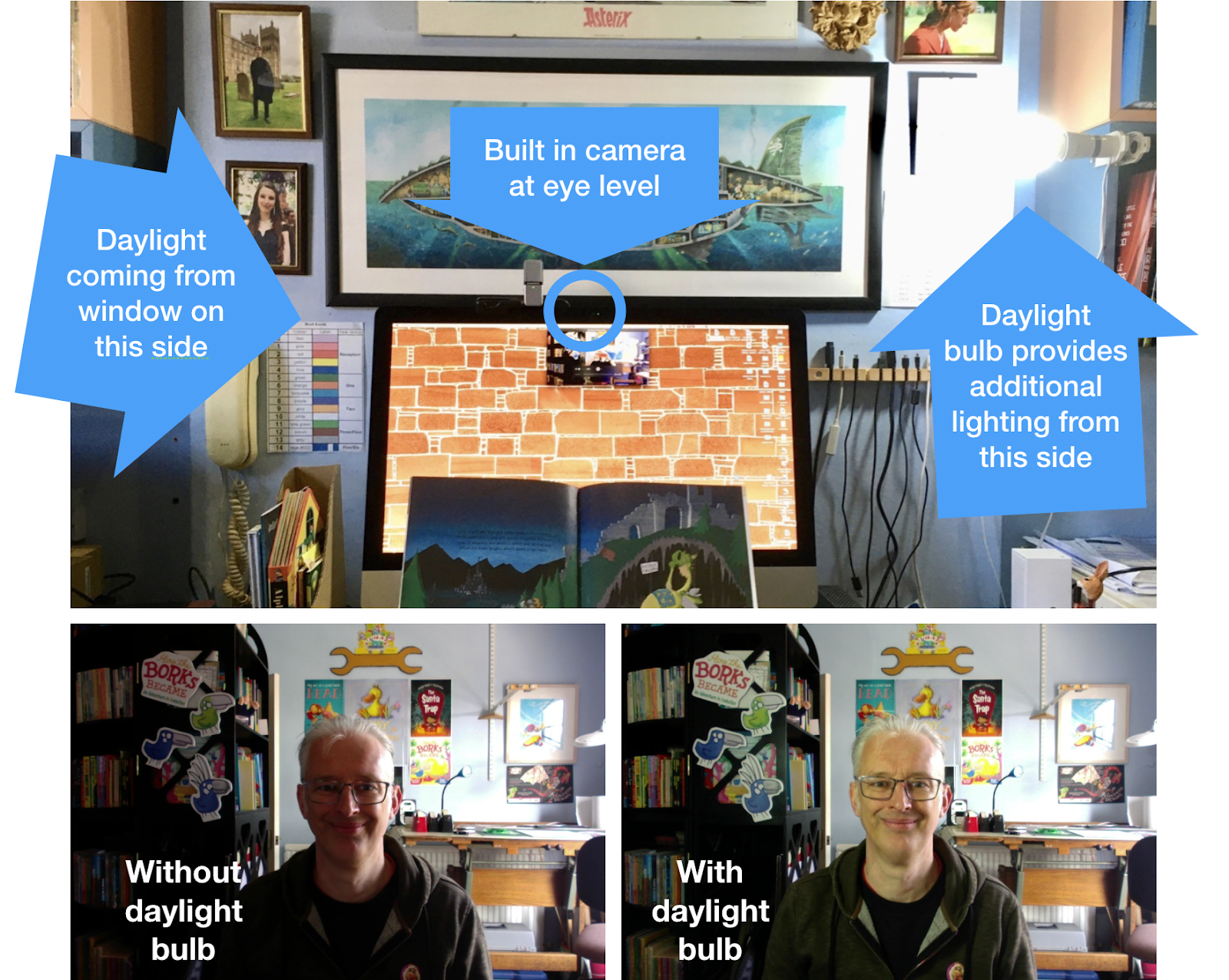
My desk faces the wall in my office. The room is well lit by a window, but the window is to my left and slightly behind me so that half of my face is in shadow when I look at the camera. To light my face evenly, I have a daylight bulb mounted slightly above head height on my right hand side. The light from the daylight bulb matches that coming from the window giving the impression that my whole face is naturally lit.
3: Get your camera angle right
One of the most common shortcomings of footage recorded on a laptop computer is a poor camera angle as a result of the laptop being below the eye-line of the user. The image on the left below was taken from a laptop sitting on the desk in front of me and gives a great view of the underside of my chin and the loft-hatch in my office ceiling. The image on the right was taken with the same laptop camera but raised to my eye-line by placing the laptop on top of a couple of boxes. The eye level version gives a far more natural view of both me and my office.
Once you have your camera at the right height, check that it is angled so that your audience can see the whole of your face and not just the top or bottom of your head.
4: Look at the camera - not the screen!
One of the things that can make computer recorded presentations feel less real than face to face presentations is a lack of eye contact. This is because computer users often look down at the screen when recording. When I’m reading a book, I try to look straight into the camera for most of the time so that the audience will feel I am reading directly to them. If you are live-streaming you may still need to look at the screen to read viewer comments and questions, so try to remember to look back at the camera before responding to them. I’m new to live-streaming with comments and am still trying to master this skill.
Note for tablet users: If you are recording using a tablet in landscape orientation, the camera will be on one side of the screen. So if you're looking at the screen rather than camera while recording, the video will show you looking to one side. The solution is the same: identify the exact spot where your camera is located on the front of your tablet (if you can't spot it easily, try waving your fingers close to the screen while the screen shows your image) and make sure you look at this point rather than the screen when recording.
5. Prevent “noises off” and other distractions
You don’t want to be distracted while you are recording, so take your landline off the hook and switch your mobile to silent. You might also consider quitting or turning off any notification sounds for software such as email and Twitter. If there are other people in the house, let them know that you are recording so that they don’t walk in on you unexpectedly, start playing loud music or run around the house banging saucepans together and yodelling (this last one may only apply to my family).
If you are live-streaming and share a broadband connection with other people in your household, you may also want to ask them to avoid using the internet for high bandwidth activities (video calls, watching video-on-demand services such as iPlayer or Netflix or transferring large files) while you are streaming to ensure that you have sufficient bandwidth to broadcast effectively.
6: Play with perspective
Objects close to the camera lens will appear abnormally large relative to more distant objects and you can exploit this to add a bit of visual fun to your readings. I often take advantage of this ‘perspective distortion’ effect in my Skype sessions with schools. Here are some examples of how I use perspective distortion when reading some of my picture books:
- The Princess and the Pig: When the queen and the farmer are holding out the princess and the pig to inspect them, I hold out my hands towards the camera to make the audience feel like they are being held.
- Pigs Might Fly!: When Wilbur pushes the big red button that fires the rocket booster and sends the wolf blasting out the back of his jet, I pretend that the camera is the button.
- The Santa Trap: When Bradley is throwing a tantrum, I move my face close to the camera so that his angry rant fills the screen.
- Prince Ribbit: When Arabella and Lucinda kiss the tiny Prince Ribbit, I give my audience a taste of what he’s experiencing by treating them to a giant smooch. This last trick always gets a big reaction, eliciting a chorus of shrieks from a young audience.
Perspective distortion can also be useful for displaying small objects to your audience. When I began reading my picture book
The Clockwork Dragon to schools I soon realised that very few of today’s children know what clockwork is. So I now preface my readings of that book by showing my audience some simple clockwork toys. When I’m sharing the book online I use the camera to give my audience a close-up view of a clockwork toy with an exposed mechanism to give them a better understanding of how clockwork works.
7: Have things to hand
If you have material relating to the book you’re reading that might interest your audience it’s a good idea to have it close to hand. For instance, when I’m sharing
The Clockwork Dragon online I often show the audience printouts of the
Machine Maze activity sheet and the
Kingdom of Rodney Visitors Guide which they can download from my website.
If you think you might want to show your audience other books that you’ve written or any other material relating to your work, it’s a good idea to have these to hand as well. Having done hundreds of Q&As in virtual school visits over the last few years, I know which questions are likely to come up and I now keep the books I can show to illustrate the answers in a magazine file beside my computer. The contents of this file include:
- The first book I had published, in both UK and US editions (since I Skype regularly with schools on both sides of the Atlantic).
- My most recent book. I show this when asked, “How many books have you had published?” so that I can give an answer along the lines of, “64 and this is my 64th book.”
- My favourite book that I’ve written myself.
- A non-fiction book that I’ve written. (Most of my books are fiction)
- A favourite book from my childhood. This particular book is also a book written by one of my favourite authors and a book that inspired me to become a writer.
I hope that the above tips will be of use to writers and illustrators getting to grips with online video. If you have any questions, comments or tips of your own, please post them in the comments box below.
And don’t forget to check out the many videos and livestreams recorded by picture book creators on the
Picture Book Authors Events Online Facebook page.